Sitting for long hours in an office chair can lead to chronic back pain. Many people wonder why do some office chairs cause back pain and how to avoid them. Poor chair design is a common culprit. Chairs that lack lumbar support can strain the lower back. This pressure may lead to discomfort and stiffness over time.
Additionally, improper posture exacerbates the issue. Slouching or leaning forward can disrupt spinal alignment. It is not just about the chair; individual habits play a significant role too. Frequent breaks and proper ergonomic practices can make a difference. Incorporating movement throughout the day helps to relieve tension.
To find relief, it is essential to choose the right chair. Look for adjustable options that support the natural curve of your spine. However, even the best chair might not solve everything. Reflecting on your daily habits and making small adjustments can lead to significant improvements in comfort and productivity.
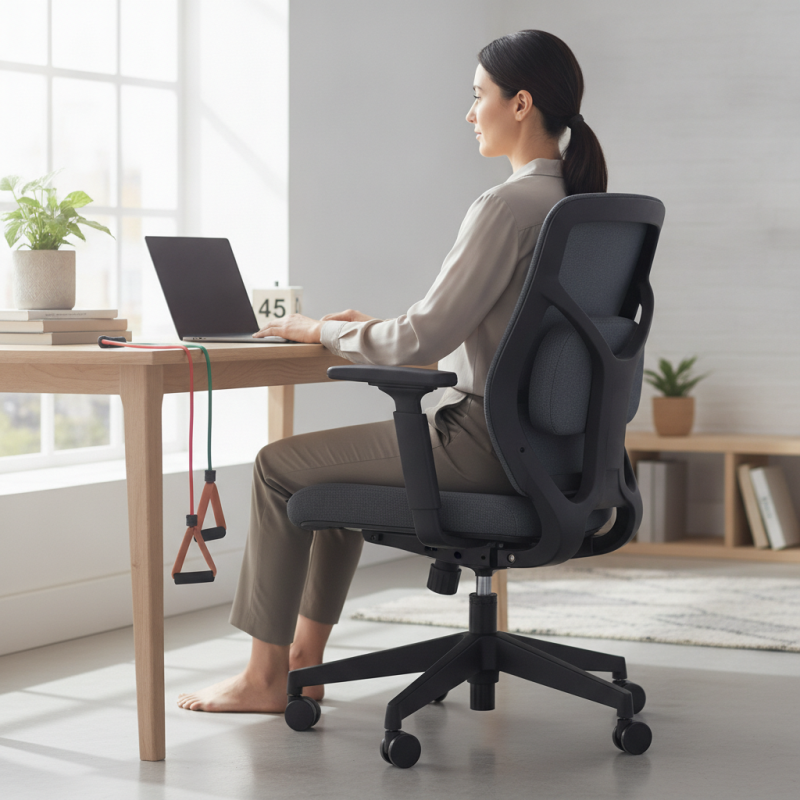
Office chairs are often designed for comfort, yet many users experience back pain. Understanding the mechanics of these chairs can help identify why this occurs. Poor ergonomics, like inadequate lumbar support, can lead to misalignment of the spine. If the chair doesn’t support the natural curve of your back, pain can easily follow.
Tips: Adjust the height of your chair. Your feet should be flat on the ground. A good chair allows your knees to be at hip level. Also, consider using a cushion for lower back support. This can alleviate some pressure on your spine.
The material and adjustability of the chair matter too. A soft chair may feel comfortable, but it often lacks the support needed for long hours of sitting. Monitor your posture frequently. Slouching can worsen back pain over time. Regular breaks for movement are essential. They remind you to stretch and shift your position. Investing time to find the right adjustments can lead to significant improvements.
Prolonged sitting in office chairs often leads to back pain. The design and support of a chair can significantly impact your posture. Many office chairs lack lumbar support. This can cause the spine to misalign. A misaligned spine puts pressure on muscles and nerves, resulting in pain.
Sitting for long hours can weaken core muscles. Weak core muscles do not support the back effectively. Poor posture is common when leaning forward or slouching. This adds extra stress on the back. Over time, even minor discomfort can develop into chronic pain.
Adjusting your chair properly is crucial. Ensure your feet rest flat on the ground. Your knees should be at hip level. Regular breaks are necessary, too. Stand, stretch, and walk around every hour. These small changes can prevent the discomfort that might already be creeping in. You may think it is just part of the job, but it does not have to be.
The design of office chairs plays a critical role in promoting good posture and spine health. Many office chairs lack essential ergonomic features, leading to discomfort and pain. For instance, a chair without lumbar support can cause slouching, putting excess pressure on the lower back. Users may not realize this until they experience chronic pain, prompting a reflection on their seating choices.
Proper seat height is another factor. Ideally, feet should rest flat on the ground. When a chair is too high or too low, it disrupts the natural alignment of the spine. Adjustability is key. A good chair allows users to customize height, backrest angle, and armrest position. Yet, many people settle for a one-size-fits-all approach, ignoring their unique body mechanics.
Lastly, the material and overall comfort of the chair contribute significantly. Hard surfaces can lead to pressure points, causing fatigue during long working hours. Cushioned seats are better but can vary widely in quality. Users should consider materials that provide support without sacrificing comfort. Reflecting on these elements is essential for anyone seeking to improve their office experience and maintain spine health.
Choosing the right ergonomic office chair is crucial for avoiding back pain. According to the American Chiropractic Association, approximately 31 million Americans experience lower back pain at some point. An ergonomic chair can significantly reduce discomfort and promote better posture. A chair that supports the natural curve of your spine is essential.
When selecting an ergonomic chair, look for adjustable features. A seat height that fits your legs is important. Your feet should rest flat on the floor. This promotes proper alignment and reduces strain. Also, opt for a chair with lumbar support, which provides extra cushioning for your lower back. A study by the Occupational Safety and Health Administration emphasizes the importance of lumbar support in reducing the incidence of musculoskeletal disorders.
Additionally, consider the material and flexibility of the chair. A breathable fabric can enhance comfort during long hours at a desk. Chairs that allow you to shift positions encourage movement, which can prevent stiffness. Remember, the ideal chair for one person may not suit another. It’s essential to test a chair before committing. Reflect on your needs and preferences to find the best option for your work environment.
Sitting in an office chair for hours can lead to significant back pain. Poor posture, combined with inadequate seating support, exacerbates this issue. Many people slump or lean forward, putting extra pressure on their spines. This habit can lead to lasting discomfort and tension in the back muscles.
To alleviate and prevent back pain, specific exercises and habits can be beneficial. Incorporating stretches like the cat-cow or child's pose can increase flexibility and relieve tension. Simple neck rolls can further ease stress. Try to stand up every 30 minutes. Take a brief walk or do a few light stretches at your desk. These small adjustments can make a big difference.
Mindful habits are essential. Be aware of your posture while seated. Use support pillows if necessary. Engage your core muscles, which helps stabilize the spine. Building a routine with short exercise sessions can also help strengthen your back. Adjusting simple daily habits goes a long way in combating and preventing discomfort.
: Many chairs lack proper lumbar support, leading to spine misalignment and pain.
Adjust the chair height so your feet are flat, and knees at hip level.
A cushion provides added lower back support, alleviating pressure on your spine.
Sitting for long hours weakens core muscles, which do not effectively support the back.
Regularly monitor your posture and avoid slouching to reduce pressure on your back.
Take brief breaks every hour to stretch, stand, or walk around.
Stretches like the cat-cow or child’s pose can enhance flexibility and reduce tension.
Soft chairs may feel comfortable but often lack the support needed for prolonged sitting.
Engage in short exercise sessions regularly and be mindful of your sitting habits.
Yes, simple changes can lead to significant improvements in comfort and reduce pain.
The article "Why Do Office Chairs Cause Back Pain and How to Prevent It?" explores the relationship between office chair design and back pain, providing insights into why discomfort often arises. It first examines the mechanics of office chairs and the common causes of back pain associated with prolonged sitting, such as poor posture and inadequate lumbar support. The impact of chair design on posture and spine health is also discussed, highlighting how certain features can contribute to or alleviate discomfort.
To address the question of why do some office chairs cause back pain and how to avoid them, the article offers practical tips for selecting an ergonomic chair and emphasizes the importance of incorporating exercises and habits that can help mitigate and prevent pain. By understanding these elements, individuals can make informed choices that promote better spinal health and reduce the likelihood of developing back pain while working at a desk.

Layanaa Furniture