2026 Best Office Chairs for Back Pain How to Avoid Pain?

Time:2026-10-25 Author:Ethan
0%

Choosing among the 2026 best office chairs for back pain requires more than trusting thick cushions or impressive marketing. A chair may look supportive in a showroom, yet press painfully behind your knees after two hours. The real question is why do some office chairs cause back pain and how to avoid them?

Dr. Alan Hedge, an ergonomist and professor emeritus at Cornell University, often emphasized, “The best posture is the next posture.” His point remains practical. Even an excellent chair cannot protect a body that stays frozen all day. Proper lumbar support, adjustable seat depth, stable armrests, and a height that keeps your feet flat can reduce unnecessary strain. Your monitor should also sit near eye level, or your neck may compensate.

Small adjustments matter.

Look for a backrest that supports your natural curve without forcing your spine forward. Test whether you can sit fully back while keeping two or three fingers between the seat edge and your knees. A breathable cushion may prevent heat and pressure, but softness alone is not support. This is where many buying guides become too confident. No chair suits every body, desk, or working habit.

A reliable choice should encourage movement, not promise permanent comfort. Stand briefly, change your sitting angle, and walk during long tasks. If pain continues, worsens, or spreads into your legs, consult a qualified healthcare professional. Use this guide as informed research, not a diagnosis. Your daily setup deserves honest testing.
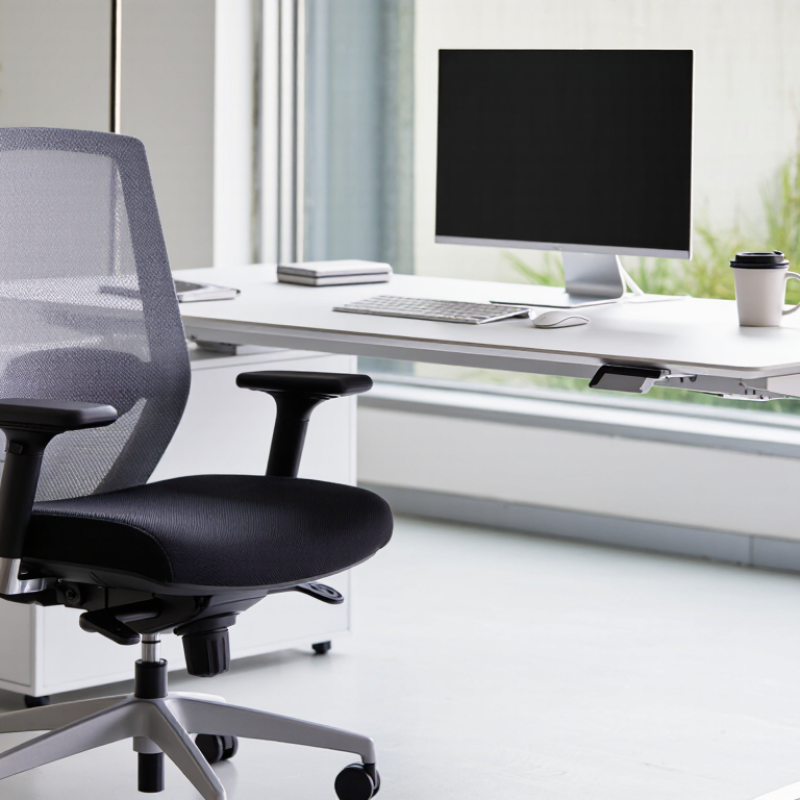
2026 Best Office Chairs for Back Pain How to Avoid Pain?

The 2026 Office-Chair Market: Back-Pain Risks in WHO and NIOSH Data

2026 Best Office Chairs for Back Pain: How to Avoid Pain?

The 2026 office-chair market deserves a careful look beyond padding and appearance. The World Health Organization identifies low back pain as a leading cause of disability worldwide. Prolonged sitting, limited movement, and poor work posture can increase daily strain. These risks do not come from one chair alone. They develop through repeated habits.

NIOSH workplace ergonomics guidance supports adjustable seating and a neutral working posture. Your feet should rest flat, while your hips remain level with or slightly above your knees. The backrest should support the natural curve of your lower back. Armrests can reduce shoulder tension when they keep your elbows near your body. Adjustability matters more than thick cushioning.

Move often.

Stand briefly every 30 to 60 minutes. Change your viewing distance, relax your shoulders, and avoid leaning toward the screen. A chair that feels comfortable for ten minutes may still encourage slouching after two hours. That is an important weakness in quick product testing. Personal fit also varies with height, body proportions, desk position, and existing pain. No chair can guarantee prevention or treat an underlying condition. Persistent numbness, weakness, or worsening pain requires professional medical advice. The most reliable choice is a chair you can adjust, test, and reassess during a normal workday.

2026 Best Office Chairs for Back Pain: How to Avoid Pain?

The 2026 Office-Chair Market: Back-Pain Risks in WHO and NIOSH Data

The World Health Organization estimated that low back pain affected approximately 619 million people worldwide in 2020 and projects that this number may reach 843 million by 2050. NIOSH identifies prolonged static or awkward postures, force, and repetitive movements as important ergonomic risk factors. A supportive chair can help reduce exposure to poor sitting posture, but regular movement, adjustable workstation height, and appropriate ergonomic setup are also important.

Sources: World Health Organization, “Low back pain”; National Institute for Occupational Safety and Health, “Musculoskeletal Health Program.”

Ergonomic Chair Measurements Based on ISO 9241-5 and OSHA Guidance

A good office chair for back pain starts with measurements, not marketing. ISO 9241-5 emphasizes adjustability, neutral posture, and support for different body sizes. OSHA guidance also recommends a stable chair, adjustable height, lumbar support, and enough room to change position.

Measure from the floor to the crease behind your knee while wearing normal work shoes. Set the seat height so your feet rest flat and your knees remain near hip level. Your thighs should feel supported without pressure behind the knees. Seat depth matters too. Leave roughly two to four fingers between the seat edge and your knees. A backrest should support the natural inward curve of your lower back.

Keep elbows close to your body. Adjust armrests until your shoulders relax. Your screen should sit near eye level, preventing constant neck bending. The chair should allow small posture changes. Fixed perfection is unrealistic.

I once adjusted a chair by height alone and still felt discomfort after an hour. The seat pan was too deep. That mistake showed me why measurements must work together. People also differ in hip width, leg length, and daily tasks. Use these figures as practical starting points, then test the chair during real work. Stand briefly, shift your weight, and notice pressure points. Persistent pain deserves professional medical advice, not a chair adjustment alone.

Lumbar Support and Seat Design: Findings from Peer-Reviewed Research

2026 Best Office Chairs for Back Pain: How to Avoid Pain?

Peer-reviewed research links prolonged sitting with discomfort, but no chair prevents back pain by itself. Reviews in Applied Ergonomics suggest adjustable lumbar support can improve spinal posture and comfort. The benefit depends on fit, movement, and work habits. A 2023 World Health Organization report estimates that 619 million people experienced low back pain in 2020. That figure shows the scale of the problem, not a reason to trust one product blindly.

Seat design matters. A seat pan should support most of the thighs without pressing behind the knees. A waterfall edge may reduce pressure there. Adjustable depth is more useful than thick padding alone. Lumbar support should meet the natural curve above the belt line, rather than force the pelvis forward. Peer-reviewed studies also report mixed results, especially over longer periods. The evidence is helpful, but not tidy. I would not promise that a “perfect” chair fixes every back problem.

Tips: Set your feet flat and keep your hips slightly higher than your knees. Adjust lumbar support gently. Stand or walk for two minutes every 30 to 45 minutes. Keep the screen near eye level. Test the chair for at least a week, because first impressions can mislead. Persistent numbness, weakness, or severe pain requires professional medical advice.

Safety and Durability: Applying ANSI/BIFMA X5.1 Testing Standards

A comfortable office chair should also survive ordinary mistakes: leaning back suddenly, shifting your weight, or rolling across a rough floor. ANSI/BIFMA X5.1 provides voluntary testing methods for general-purpose office chairs. These tests examine stability, strength, durability, casters, bases, backrests, and reclining mechanisms. A chair that passes repeated loading tests is less likely to fail during daily work.

Look for clear evidence of testing, not vague claims such as “heavy duty.” Ask whether the tested model matches the chair being sold. Check the product documentation, test date, and stated weight capacity. At home, inspect the five-star base, tighten loose hardware, and notice unusual clicking or wobbling. Small defects can become serious after months of movement.

Still, ANSI/BIFMA X5.1 does not guarantee comfort or eliminate back pain. It measures safety and durability, not your posture, desk height, or personal anatomy. I have found that a sturdy chair can feel wrong when its seat depth is excessive. That matters. Adjust the lumbar support, keep both feet stable, and avoid forcing a reclining position. Standards offer useful evidence, but real-world fit requires patience and occasional doubt.

How to Adjust Your Chair: Evidence-Based Setup for Pain Prevention

A good office chair cannot prevent back pain if it is poorly adjusted. Evidence from ergonomics research supports a neutral, supported posture with frequent movement. Set the seat so both feet rest firmly on the floor. Keep your knees near hip level, or slightly lower. Your thighs should feel supported without pressure behind the knees. I once raised my seat too far, thinking a taller position looked more professional. My lower back disagreed.

Adjust the backrest until it follows your natural spinal curve. The lumbar support should fill the small hollow above your belt line, not push aggressively into it. Recline slightly, around 100 to 110 degrees, rather than sitting rigidly upright. Keep your shoulders relaxed and your elbows close to your body. Aim for roughly 90 degrees at the elbows. Check your setup from the side. A phone photo can reveal a rounded back that feels normal.

Place the monitor about an arm’s length away. Its top edge should sit near eye level, so your chin does not drift toward your chest. Keep the keyboard close enough to avoid reaching. Change position every 30 to 45 minutes, even briefly. Stand, walk, or stretch for one minute. Small resets matter. Still, no setup works for everyone. Persistent pain, numbness, or weakness deserves assessment from a qualified healthcare professional, especially when adjustments fail to help.

FAQS

Can an office chair prevent all back pain?

No chair can prevent every case of back pain. Comfort depends on fit, movement, posture, and work habits. The evidence is not perfect.

How should I adjust the seat height?

Keep both feet flat on the floor. Your hips should sit level with, or slightly above, your knees. Avoid raising the seat too high.

How deep should the seat be?

The seat should support most of your thighs. Leave space behind your knees to avoid pressure. A waterfall-shaped edge may feel more comfortable.

Where should lumbar support sit?

Place it in the small curve above your belt line. It should support your spine gently. Do not force your pelvis forward.

Is thick padding the most important feature?

Not always. Adjustable seat depth can matter more than thick cushioning. Padding may feel good briefly, but fit lasts longer.

What sitting angle may reduce stiffness?

Recline slightly, between about 100 and 110 degrees. Keep your shoulders relaxed and elbows near your sides. Rigid upright sitting is not always better.

How often should I move during desk work?

Change position every 30 to 45 minutes. Stand, walk, or stretch for one or two minutes. Small resets matter.

How can I check my desk posture?

Place the screen about an arm’s length away. Keep its top edge near eye level. A side-view phone photo may reveal rounding you do not notice.

When should I seek professional medical advice?

Seek qualified medical advice for persistent numbness, weakness, or severe pain. Get help when chair adjustments fail repeatedly. Do not rely on a chair alone.

Conclusion

This guide examines the 2026 office-chair market through the lens of back-pain prevention, using workplace health concerns highlighted by WHO and NIOSH. It explains how chair dimensions such as seat height, depth, backrest angle, and armrest position relate to ergonomic principles in ISO 9241-5 and OSHA guidance. Readers will also learn why do some office chairs cause back pain and how to avoid them, especially when poor lumbar support, excessive seat pressure, or limited adjustability encourages awkward posture.

The article reviews findings from peer-reviewed research on lumbar support and seat design, while also introducing practical safety considerations based on ANSI/BIFMA X5.1 testing concepts for stability, strength, and durability. Finally, it provides an evidence-based setup routine: adjust the chair so feet rest firmly on the floor, knees remain near hip level, the lower back is supported, shoulders stay relaxed, and the screen is positioned comfortably. Regular movement and posture changes are emphasized alongside proper chair adjustment.

Ethan

Ethan

Ethan is a seasoned marketing professional with a deep expertise in our company's innovative product line. With a passion for sharing knowledge and insights, he takes the lead in regularly updating our corporate blog, where he explores industry trends, product features, and effective marketing......